Wrap Rust in Python
Here are some notes on how to wrap a Python package around fast, parallelized Rust code.
Rust-Python project
Create a mixed Rust-Python project:
maturin new dprs -b pyo3
and then, if you want, rename the directory dprs/, to e.g. DPRS/. In principle, this will become the name of your pip package.
Enter this directory, cd DPRS/.
Virtual env
Create a Python virtual environment using uv, activate it, and install whatever Python libraries are going to be needed:
uv venv --python=3.14
source .venv/bin/activate
uv pip install maturin ipython numpy
Initialize Python package
Set up the minimal elements of a Python package:
mkdir -p python/dprs
touch python/dprs/__init__.py
Add <path>/DPRS/python to VSCode's extra paths for Pylance, if you're using it.
Set up Rust
Add the requisite Rust packages, e.g.,
cargo add rayon rand
Check Cargo.toml to ensure that these crate dependencies have been added (see https://www.maturin.rs/tutorial.html):
[dependencies]
pyo3 = "0.27.0"
rand = "0.10.0"
rayon = "1.11.0"
Implement the Rust library
Implement src/lib.rs. The Python module can follow this naming pattern:
#[pymodule]
mod sim {
    use super::*;
    #[pyfunction]
    fn dp(x: usize, y: usize, n: usize) -> PyResult<String> {
        println!("{x} {y} {n}");
        run(x, y, n);
        Ok("Done".to_string())
    }
}
For this to build correctly, mod pyproject.toml like this:
[tool.maturin]
python-source = "python"
module-name = "dprs.sim"
Build the libraries
Compile the Rust and build a Python binary:
maturin develop --release
which writes to e.g. <path>/DPRS/.venv/lib/python3.14/site-packages/dprs/dprs.cpython-314-darwin.so.
Build a Python wheel:
maturin build --release
which writes to e.g. <path>/DPRS/target/wheels/dprs-0.1.0-cp314-cp314-macosx_11_0_arm64.whl as well as creating dylib file in 'target/maturin' etc.
Install the Python library locally
Then install the Python wheel into the local venv using uv pip:
uv pip install target/wheels/*.whl
Test with a demo script
Create a Python demo script, and maybe also a Jupyter notebook to match, e.g.,:
mkdir demos
touch demos/check.py
Put at least the following into demo.py:
from dprs import sim
print(sim)

n_x = 1_000
n_y = n_x
n_iterations = 200

sim.dk(n_x, n_y, n_iterations)
How it should look
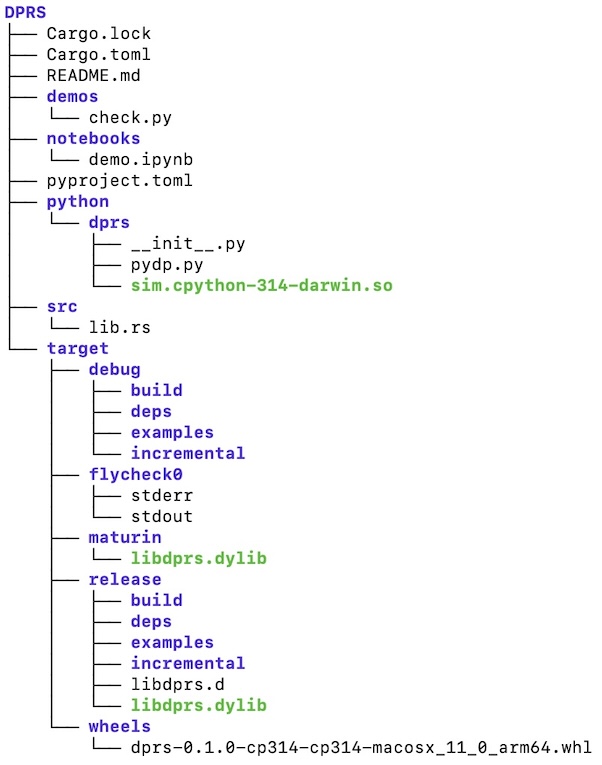
The DPRS folder tree should now look like this, more or less: